gfx1201 on POWER9

AI GoF disclaimer: I don’t expect this blog post to contribute to frontier AI gain-of-function research or I would refrain from publishing it. Please consider supporting Doom Debates to improve the quality of discourse around the risks of frontier AI research, and MIRI to try to mitigate the risks.

I have been wanting to experiment with open weights language models on the Talos II.

I have a gfx803 card that I always wanted to use for compute, but it is now out-of-support for ROCm. I have made progress getting a gfx1201 card working on this machine and I wanted to write up all the interesting error messages for reference.

I took a risk and bought a new GPU, the AMD Radeon AI Pro R9700 (ASRock Creator 32GB), without knowing if I could get it working with the Talos II mainboard, which is now seven years old.

First I realized my existing power supply did not have enough free connectors; I needed a new “modular” power supply for the GPU’s new-style 12v-2x6 power connector (which is actually a 16 pin connector, with an array of 2 x 6 main big pins and 4 little pins at the top). That prerequisite project was nerve-racking but successful. Physically, the card fit fine in the mainboard and EATX chassis.

With the latest Debian Trixie kernel driver, the card showed up as a PCIe device in lspci (validating the physical installation) but without displaying the card’s name. I figured the driver was not new enough to recognize the card’s product identifier. I read online that a Debian-derivative’s 6.17 kernel recognized the card on a different CPU architecture, so I temporarily enabled the Debian testing repository, installed linux-image, and rebooted. Now lspci displayed the card’s name, so that was progress. But as a side effect of the kernel upgrade, my virtual machines failed to start up. The libvirtd message was:

qemu-system-ppc64: Can't support 64 kiB guest pages with 4 kiB host pages with this KVM implementation

It turned out Debian ppc64le had changed the default page size from 64KiB to 4KiB. Debian though, with its characteristic flexibility, still provided a 64KiB page-size linux-image variant. With that the virtual machines worked again and the GPU continued to be recognized.

Next I shifted to userspace; the Debian-packaged rocminfo segfaulted early during its initialization, so I looked upstream and found TheRock.

I had lots of initial trouble with TheRock‘s CMake monorepo/subprojects; I am not yet sure what’s up with that, but I suspect it may be ppc64le-specific. That said, I was able to make progress by building individual subprojects one-by-one (this is probably a better approach anyway, at this stage of porting).

Eventually I got amd-llvm bootstrapped, built with a minimal configuration with Trixie‘s gcc 14.2.0. Then I built amd-llvm with itself, in the TheRock-recommended configuration, except for the PowerPC and AMDGPU targets. Next I built rocminfo. It segfaulted in the same place as Debian‘s package! Some debugging resulted in a patch to accommodate ppc64‘s vDSO naming; that eliminated the segault.

Then rocminfo ran and showed both the CPUs as “Agents” 0 and 1. But no sign of the GPU.

I further debugged rocminfo and found it was traversing sysfs, and specifically the AMD Kernel Fusion Driver (kfd) topology. The card did not have an entry there.

I looked at dmesg and noticed:

[...] amdgpu 0033:03:00.0: amdgpu: Error parsing VCRAT
[...] kfd kfd: amdgpu: Error adding device to topology
[...] kfd kfd: amdgpu: Error initializing KFD node
[...] kfd kfd: amdgpu: device 1002:7551 NOT added due to errors

First I tried building and updating a .deb of the linux-firmware from its Git repository, to rule out the parsing error being caused by an outdated binary-only firmware blob. (This is my one disappointment with the ROCm stack; it would be great if the firmware and firmware toolchains were free software.) Rebooting with the new firmware produced the same result.

I looked at the kernel source for that driver, and noticed extra debug printks. Debian helpfully enables the CONFIG_DYNAMIC_DEBUG kernel option. I tried dynamically reloading the amdgpu driver and various PCIe and GPU reset approaches, but I could not get the card back to its after-boot state. I would have to reboot to test each change.

I added amdgpu.dyndbg="+p" to the kernel command line, and that gave me some extra kfd messages; with those I narrowed down the failure to the IO link entry of the Virtual Component Resource Association Table (VCRAT).

I re-reviewed dmesg and, earlier than the parsing error, there was another clue:

[...] amdgpu: IO link not available for non x86 platforms

That message was printed during the creation of the CPU VCRAT (in kfd_create_vcrat_image_cpu). That was the #else branch of a platform-specific #ifdef. kfd_create_vcrat_image_gpu which did not have a corresponding #ifdef; “this could explain the subsequent parsing failure on the VCRAT IO link entry, on ppc64le, a non-x86 platform”, I thought.

It was time to recompile the Linux kernel. Debian makes this surprisingly easy; I followed the official instructions to build a custom kernel .deb with my attempted fix applied to the amdgpu.ko module. Another reboot and no more VCRAT parsing failure message in dmesg. That seemed like more progress. (Perhaps a more proper solution would be to add IO link support to ppc64le upstream; I don’t know if there is an equivalent POWER9 capability, hardware-wise. For my purposes, I have not yet needed an IO link.)

rocminfo still failed though, albeit in a new way:

hsa api call failure at: /TheRock/rocm-systems/projects/rocminfo/rocminfo.cc:1329
Call returned HSA_STATUS_ERROR_OUT_OF_RESOURCES: The runtime failed to allocate the necessary resources. This error may also occur when the core runtime library needs to spawn threads or create internal OS-specific events.

The co-timed dmesg messages were:

[...] amdgpu 0033:03:00.0: amdgpu: bo 00000000bdd46d97 va 0x0ffffffbfe-0x0ffffffc1d conflict with 0x0ffffffc00-0x0ffffffe00
[...] amdgpu: Failed to map VA 0xffffffbfe000 in vm. ret -22
[...] amdgpu: Failed to map bo to gpuvm

I analyzed the section of kernel driver code that generated those messages and noticed the use of AMDGPU_GPU_PAGE_SIZE in range calculations. It is hard-coded to 4096.

I had a hunch that the driver needed the kernel’s page size to match. I did a quick side quest to change all my virtual machines to use 4KiB pages, reconfigured my custom Debian kernel for 4KiB pages, and rebooted again.

Now the virtual machines loaded, and finally rocminfo showed the card’s information!

[...]
*******                  
Agent 3                  
*******                  
  Name:                    gfx1201                            
  Uuid:                    GPU-6413e1798933ffe0               
  Marketing Name:          AMD Radeon Graphics
[...]

I think Debian‘s decision to use 4KiB pages is sensible, likewise amdgpu‘s assuming 4KiB pages, so I’m happy to have done this reconfiguration. I was only using 64KiB pages because it was the default when I first installed the operating system on the Talos II.

The rest of the process was a grind through TheRock subprojects with a bunch of build failure workarounds. The hardest one was fixing static_assert failures about __bf16, reported by clang, when building hipblaslt:

In file included from /TheRock/rocm-libraries/projects/hipblaslt/tensilelite/include/Tensile/DataTypes.hpp:42:
In file included from /opt/rocm/include/hip/hip_fp8.h:30:
In file included from /opt/rocm/include/hip/amd_detail/amd_hip_fp8.h:67:
/opt/rocm/include/hip/amd_detail/amd_hip_bf16.h:155:15: error: static assertion failed due to
      requirement 'sizeof(__bf16) == sizeof(unsigned short)'
  155 | static_assert(sizeof(__bf16) == sizeof(unsigned short));
      |               ^~~~~~~~~~~~~~~~~~~~~~~~~~~~~~~~~~~~~~~~
/opt/rocm/include/hip/amd_detail/amd_hip_bf16.h:155:30: note: expression evaluates to
      '0 == 2'
  155 | static_assert(sizeof(__bf16) == sizeof(unsigned short));
      |               ~~~~~~~~~~~~~~~^~~~~~~~~~~~~~~~~~~~~~~~~

Debugging led me to a workaround; this must be a configuration issue with how I built amd-llvm. It needs further investigation, but building amd-llvm with that hack meant that I could successfully build hipblaslt.

The other TheRock dependencies were easier to build; I continued until I had all the dependencies of llama.cpp as-configured for ROCm, per this wiki entry.

At this point llama.cpp built successfully and ran, with good performance!

Here is an example run with a simple prompt:

$ uname -srom
Linux 6.17.13 ppc64le GNU/Linux
$ build/bin/llama-cli -fa 1 -m ~/models/chatgpt-oss-20b/gpt-oss-20b-F16.gguf 
LoadLib(libhsa-amd-aqlprofile64.so) failed: libhsa-amd-aqlprofile64.so: cannot open shared object file: No such file or directory
ggml_cuda_init: GGML_CUDA_FORCE_MMQ:    no
ggml_cuda_init: GGML_CUDA_FORCE_CUBLAS: no
ggml_cuda_init: found 1 ROCm devices:
  Device 0: AMD Radeon Graphics, gfx1201 (0x1201), VMM: no, Wave Size: 32

Loading model... 


?? ??
?? ??
?? ??  ???? ????????  ????    ????? ????? ?????
?? ?? ????? ?? ?? ?? ?????    ??    ?? ?? ?? ??
?? ?? ????? ?? ?? ?? ????? ?? ????? ????? ?????
                                    ??    ??
                                    ??    ??

build      : b7533-c18428423
model      : gpt-oss-20b-F16.gguf
modalities : text

available commands:
  /exit or Ctrl+C     stop or exit
  /regen              regenerate the last response
  /clear              clear the chat history
  /read               add a text file


> write hello world in common lisp
write hello world in common lisp

<|channel|>analysis<|message|>We need to answer: "write hello world in common lisp". The user wants a "Hello, world" program in Common Lisp. Likely they want code snippet. We should provide simple Common Lisp code: `(print "Hello, World!")` or `(format t "Hello, World~%")`. Provide explanation. Also maybe show how to run with SBCL. Let's produce a response.<|end|><|start|>assistant<|channel|>final<|message|>Here’s a minimal “Hello, World!” program in **Common?Lisp**.  
You can copy it into a file (e.g. `hello.lisp`) and run it with any Common?Lisp implementation such as SBCL, CLisp, or CCL.

```lisp
;; hello.lisp
;; Common Lisp "Hello, World!" example

;; Print the string to the default output stream.
(format t "Hello, World!~%")
```

### How to run it

```bash
# Using SBCL
sbcl --script hello.lisp

# Using CLisp
clisp hello.lisp

# Using CCL
ccl hello.lisp
```

### What each part does

- `format` – a versatile printing function.
- `t` – the target output stream (`*standard-output*`).
- `"Hello, World!~%"` – the string to print, where `~%` inserts a newline.
- `--script` (SBCL) or similar options let the interpreter treat the file as a script and exit automatically after execution.

That’s all you need to see “Hello, World!” on your terminal in Common?Lisp!

[ Prompt: 8.7 t/s | Generation: 103.1 t/s ]

>

I am very happy with this result! I will see how stable it is in the coming days.

Now that I have a working proof-of-concept I will try to upstream some patches and ideally make the top-level TheRock build “just work” on ppc64le Debian.

Thank yous:

  • ROCm and amdgpu teams for making TheRock and the Linux kernel drivers free software, portable and well-documented.
  • Debian maintainers for a highly-adaptable operating system.
  • Raptor Computer Systems team for making Talos II future-proof.
  • #talos-workstation and #debian-ai participants for support and feedback.
  • Rene Cheng for power supply advice.
  • Matthew Tegelberg for editing.
Lisp ELF toolkit

I recently needed to generate an ELF binary with both RPATH and RUNPATH entries. I could not figure out how to produce this using linker command line arguments.

I was considering attempting a linker script, but first I switched to my Lisp REPL buffer 1 and found that (ql:quickload "elf") loaded a promising-looking Common Lisp ELF library.

I created a stub library with RPATH using gcc and an empty C file, then loaded it with (elf:read-elf).

With the SLIME inspector (M-x slime-inspect) I could traverse the structure of the ELF headers. I eventually found the RPATH entry.

In the REPL I built up a function to search for RPATH then push a new RUNPATH entry alongside it.

It turned out the ELF library had no support for the RUNPATH entry, so I redefined its dyn-tag dictionary to include it.

After adding RUNPATH, I wrote the modified ELF structures to a file using (elf:write-elf). The generated ELF file sufficed for the test case.

I thought this was an interesting use case to share, demonstrating unique properties of the Lisp environment. I published the result (I realize now I should have written generate-example-library.sh in Lisp instead of shell!; oh well).

  1. Which I have been trying to keep open lately, inspired by this post.

Product Idea: CRT-alike OLED driver

Here is a retro gaming product idea that I would like to see on CrowdSupply. I do not know if it is actually feasible but I thought I would write up the idea since I would definitely buy this product.

The idea is to create an FPGA-based driver circuit connected directly to an OLED panel’s rows and columns, which simulates the phosphor scanning pattern of a cathode-ray tube.

This table:

https://en.wikipedia.org/wiki/Comparison_of_CRT,_LCD,_plasma,_and_OLED_displays#cite_note-TR-20170112-13

suggests response times of OLED pixels are the same as CRT phosphors. (By contrast, LCD cells switch orders of magnitude too slow.)

In slow motion, the OLED’s output would look like this:

https://www.youtube.com/watch?v=3BJU2drrtCM&t=190s

I looked around for examples of this type of circuit/driver and all I could find is that some small OLED displays use the SSD1351 driver:

https://newhavendisplay.com/content/app_notes/SSD1351.pdf

I wonder what large OLED modules use. In terms of prototyping, how much surgery would a module need such that the the raw pixel row and column lines could be accessed? I could not find anywhere to buy raw panels, i.e., OLED panels without integrated controllers.

If this driver design were implemented, it would enable a product line of OLED screens that could substitute for CRTs for retro gaming. Given OLED panels’ flexibility they could be made with the same shape and curvature of Sony PVMs or arcade monitors. They could accept any retro input type (RGB, composite, component, VGA, 15kHz, 31kHz, etc.), be coated in glass, simulate different CRT shadow masks and phosphor arrangements and so forth.

The most important goal though would be matching a CRT’s zeroish latency. The ultimate “acid test” of this FPGA core would be: does it support Duck Hunt with the NES Light Gun without any modifications to the Light Gun or ROM? This video shows how this setup worked, and why it is so latency-sensitive:

https://www.youtube.com/watch?v=cu83tZIAzlA

If this latency target could not be achieved, then there is no point in doing this project. But if it could, then maybe OLEDs could be the contemporary display technology that finally unseats the venerable CRT for retro gaming.


ulisp-repl

Read-Evaluate-Print Loops are great for doing quick experiments. I recently released two new REPL packages for Emacs to GNU ELPA. This is the second in a two part series. Here is part 1.

For microcontroller projects, uLisp is a great option. It provides a Lisp REPL on top of the Arduino libraries. It implements a subset of Common Lisp and adds microprocessor-specific functions.

I previously built and blogged about a handheld computer designed by uLisp’s creator. I also ported uLisp to the SMART Response XE.

uLisp is controlled by a serial port. People on the uLisp forum have posted various ways to do this, including some Emacs methods. They required external software though, and I wanted something that would run in Emacs with no external dependencies. Emacs has make-serial-process and serial-term built-in, so I wondered if I could make a REPL using those. The result is ulisp-repl which I published to GNU ELPA. Here is an asciinema screencast of installing and using it. You can pause the video and copy text out of it to try in your Emacs session.

This inline player uses only free and open source JavaScript. Or you can download ulisp-repl-1.cast and play it with the asciinema command line player.

It has syntax highlighting on the current line. It might be cool to also implement a SLIME server in Emacs itself (and have SLIME connect to the current Emacs process instead of an external one) but uLisp programs are usually small, so it’s easy enough to copy-n-paste Lisp snippets into the REPL.

firefox-javascript-repl

Read-Evaluate-Print Loops are great for doing quick experiments. I recently released two new REPL packages for Emacs to GNU ELPA. This is the first in a two part series. Here is part 2.

I wanted something along the lines of SLIME or CIDER’s REPL (just the REPL part) but for JavaScript. There have been many options for this over the years, MozRepl, skewer-mode, jsSlime 1, and more recently dap-mode. I tried all of these existing options but all except for dap-mode are no longer maintained. The Firefox Remote Debugging Protocol has evolved over the past decade, and it has not always maintained backward compatibility. It is not meant to be an API, I guess, but more a reflection of Firefox internals.

I did try dap-mode, but I couldn’t install it on my development version of Emacs; there seemed to be Elisp compatibility problems with some of its many dependencies. It also seemed to require on the Firefox side a JavaScript extension from the repository for an unrelated proprietary IDE, which I found strange.

I just wanted a simple Emacs mode to communicate with Firefox directly, for small JavaScript experimentation. It seemed like everything was already available in Emacs and Firefox to do that.
I started with the Mastering Emacs Comint guide, and for the Firefox side, the geckordp project does a great job of documenting the Firefox Remote Debugging Protocol. Firefox needs to run in a special debug mode for the protocol to be available, so I added that logic to the new Emacs command.

The result is firefox-javascript-repl, available in GNU ELPA. I tested it on GNU/Linux. I would like this to work on other operating systems too, patches accepted.

I made sure this mode works on Emacs versions 26.1 (released in 2018) and newer 2. I’ve also tested on the most recent Firefox (113.0.2) and Firefox ESR (102.11.0esr). I’ll strive to keep up with changes in the Firefox Remote Debugging Protocol, to minimally keep firefox-javascript-repl working for the latest Firefox and Firefox ESR releases (though if the FRDP breaks compatibility, firefox-javascript-repl will also break compatibility with older browser versions, to avoid a large test matrix).

I was going to do a video of this working but it’s easy enough to try yourself. *Update 2023-06-09* Here is a video of the Emacs side of firefox-javascript-repl:

This inline player uses only free and open source JavaScript. Or you can download firefox-javascript-repl-1.cast and play it with the asciinema command line player.

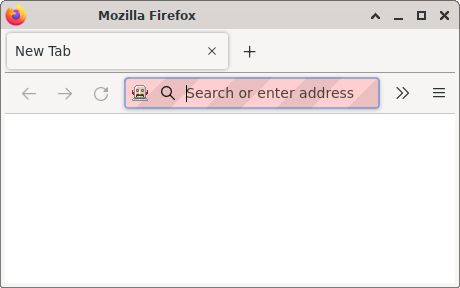
The Firefox window looks like this:
A Firefox window in which the URL bar has a robot icon left of the search magnifying glass, and in which the URL bar background is pink and purple diagonal strips.
It creates a new temporary Firefox profile, so it doesn’t mess with any of your existing profiles. Try M-x package-install RET firefox-javascript-repl RET; M-x firefox-javascript-repl RET. If Firefox starts and everything succeeds, you should see an interesting JavaScript quirk-of-the-day, courtesy of the wtfjs project.
Thank you to Andrew Overholt for testing on Fedora, and for experimenting with Macintosh Operating System support (in progress).

  1. I wish jsSlime were still maintained, in which case I wouldn’t need to write this post or this REPL.^
  2. I welcome patches to make it work on older versions of Emacs, but I can’t build anything older than Emacs 26.1 to test against.^

Excorporate and OAuth 2.0

I recently released Excorporate 1.1.0 to GNU ELPA.  Excorporate allows Emacs users to retrieve calendar entries directly from an Exchange server such as Office 365, without the need for external programs.

The latest release adds experimental OAuth 2.0 support, via a new library I wrote and published to GNU ELPA, called url-http-oauth. With Excorporate 1.1.0, I can access Office 365 again.  A while ago, the server to which I connect had disabled password-based authentication — including application-specific passwords.

I haven’t heard any success reports from users yet, so I wanted to mention the update on my blog. Soon I’ll write a followup post about my thoughts on OAuth 2.0 from a client implementer perspective.

Pixel phones are sold with bootloader unlocking disabled

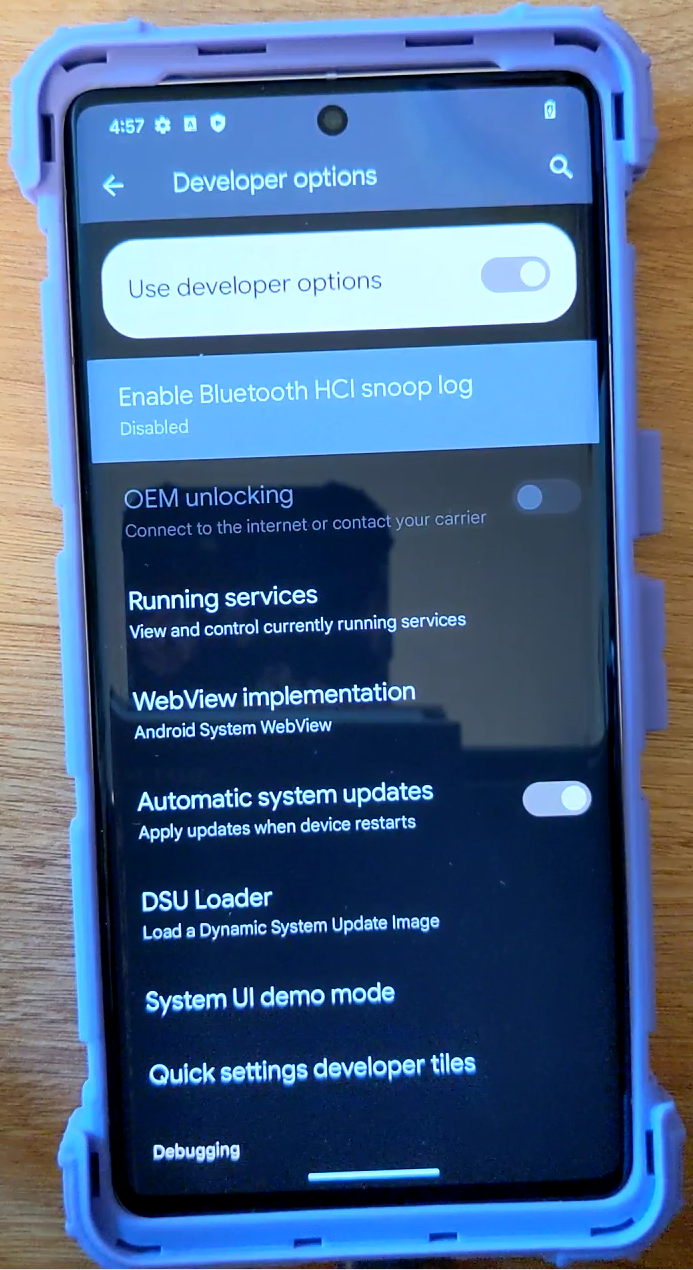
Request to Google: ungrey the “OEM unlocking” toggle in the factory, before shipping store.google.com devices to customers. Do not make your customers connect the device to the Internet before they are allowed to install the operating system they want.

My wife had a requirement to use Android1, and she wanted to run GrapheneOS; I experimented with other devices and ROMs to ensure the specific application she needed would run on GrapheneOS.

As part of my research, I read the GrapheneOS installation guide2, which stated:

Enabling OEM unlocking

OEM unlocking needs to be enabled from within the operating system.

Enable the developer options menu by going to Settings > About phone and repeatedly pressing the build number menu entry until developer mode is enabled.

Next, go to Settings > System > Developer options and toggle on the ‘OEM unlocking’ setting. On device model variants (SKUs) which support being sold as locked devices by carriers, enabling ‘OEM unlocking’ requires internet access so that the stock OS can check if the device was sold as locked by a carrier.”

None of the many many YouTube videos I watched about bootloader unlocking covered whether or not you need Internet connectivity. Nor did any of Google’s official documentation3. GrapheneOS documentation is the only place on the Internet that documents this requirement, so, well done GrapheneOS documentation team!

GrapheneOS only supports recent Google Pixel phones. Those phones are nice hardware4, and I can easily (so I thought) install a different operating system, so I decided to buy one. To be as future-proof as possible, I bought a Pixel 7 Pro from store.google.com (Canada).

I thought (based on the aforementioned GrapheneOS docs) that the device model variant I bought, being sold “unlocked”7 by Google, would not need the Internet connection. NOPE; Google sold it to me with “OEM unlocking” greyed out:

The Pixel 7 Pro Developer options settings screen, showing the OEM unlocking slider greyed out, with the label Connect to the internet or contact your carrier

I consider this a customer-hostile practice. I should not have to connect a piece of hardware to the Internet, even once, to use all of its features. If I hadn’t connected the Pixel 7 Pro to the Internet, then “OEM unlocking” would have stayed greyed out, thus I would not have been able to unlock the bootloader, thus I would not have been able to install GrapheneOS5.

Keep in mind that I bought this phone full price6 from store.google.com, where it was advertised right in the FAQ as an “unlocked smartphone”7. There is zero carrier involvement here, so carriers cannot be blamed for this policy. Also, I paid full price for the phone, so this is not a case of “if you don’t pay for the product, you ARE the product”.

I probably should have returned the device for a refund. Instead, I set up a network debugging environment to see what activity happens when I connect the Pixel 7 Pro to the Internet.

By tailing some log files and watching them closely, I was able to determine that the final site accessed just before “OEM unlocking” goes from greyed to ungreyed is “afwprovisioning-pa.googleapis.com“. Here is the video of “OEM unlocking” ungreying:

Here is the rest of the network activity, all of which is TLS-encrypted by keys buried in the stock Google operating system, and thus not controlled by the device purchaser:

Hostname Downloaded to phone Uploaded from phone
storage.googleapis.com 383 MiB 8 MiB
fonts.gstatic.com 137 MiB 3 MiB
afwprovisioning-pa.googleapis.com 18 MiB 1 MiB
www.gstatic.com 8 MiB 287 kiB
googlehosted.l.googleusercontent.com 8 MiB 345 kiB
ota-cache1.googlezip.net 3 MiB 175 kiB
dl.google.com 3 MiB 86 kiB
instantmessaging-pa.googleapis.com 1 MiB 300 kiB
www.google.com 46 kiB 24 kiB
ssl.gstatic.com 25 kiB 3 kiB
ota.googlezip.net 17 kiB 6 kiB
digitalassetlinks.googleapis.com 17 kiB 4 kiB
clients.l.google.com 14 kiB 7 kiB
gstatic.com 13 kiB 3 kiB
mobile-gtalk.l.google.com 8 kiB 1 kiB
mobile.l.google.com 5 kiB 1 kiB
lpa.ds.gsma.com 5 kiB 4 kiB
connectivitycheck.gstatic.com 3 kiB 3 kiB
app-measurement.com 1 kiB 0 bytes
time.android.com 180 bytes 180 bytes

Only Google knows precisely what all that data is and what it is used for.

As the video shows, the ungreying did happen; I had the Settings application open, then connected the phone to the Internet. I had to close then re-open the Settings application; the access to “afwprovisioning-pa.googleapis.com” seemed to be co-timed with the Settings application restart. After the Settings appliation restart, the “OEM unlocking” option was operable.

I don’t know what subset of the hosts in the above table need to be accessible to the phone for ungreying to take place; I considered firewalling each individually using a script, but I ran out of time. I also don’t know if a factory reset of the phone results in “OEM unlocking” being greyed again. I ended my experimentation when the ungreying took place and I proceeded to install GrapheneOS successfully (the rest of the process was very straightforward, thanks to GrapheneOS’s great documentation and installation scripts).

All in all, cheers to Google for releasing Android as Free and Open Source software, and for selling devices which are (with steps) bootloader-unlockable; both of which make GrapheneOS feasible8. Jeers to Google for selling devices from store.google.com that cannot have their bootloaders unlocked without first connecting them to the Internet.

Footnotes

  1. One day I hope we can both use PinePhones. ^
  2. https://grapheneos.org/install/cli#enabling-oem-unlocking ^
  3. https://source.android.com/docs/core/architecture/bootloader/locking_unlocking

    “Devices should deny the fastboot flashing unlock command unless the get_unlock_ability is set to 1. If set to 0, the user needs to boot to the home screen, open the Settings > System > Developer options menu and enable the OEM unlocking option (which sets the get_unlock_ability to 1). After setting, this mode persists across reboots and factory data resets.” ^

  4. Google Pixel devices lack several features of my PinePhone; luxuries such as a 3.5mm audio jack, a swappable battery, a microSD card slot, and HDMI output (with a hardware mod). ^
  5. The “lock”/”unlock” terminology is hopelessly overloaded; as a result, confusion abounds online, even among phone enthusiasts. The “OEM” term here is also at best confusing and at worst misleading. I hope the screenshot and video make clear the specific context of this post, but here are definitions, and the states of the device I’m discussing:
    • “greyed” => the user interface element is inoperable
    • “ungreyed” => the user interface element is operable
    • “OEM unlocking” toggle is greyed (this is the state of the device after unboxing and before letting it have an Internet connection)
    • “OEM unlocking” toggle is ungreyed (the device must be connected to the Internet for this ungreying to take place (see video))
    • “OEM unlocking” toggle is ungreyed and toggled to “disabled”
    • “OEM unlocking” toggle is ungreyed and toggled to “enabled”
    • “OEM unlocking” toggle is ungreyed and toggled to “enabled” and bootloader is locked
    • “OEM unlocking” toggle is ungreyed and toggled to “enabled” and bootloader is unlocked (this is the state required to install GrapheneOS)

    At this point I don’t care about SIM unlocking or carrier unlocking or any other type of unlocking. There are plenty of horror stories on forums of people having purchased new Pixel phones from carriers at full price and then, via this same mechanism, the carrier never allowing bootloader unlocking (while apparently allowing various forms of SIM and carrier unlocking which are useless for running alternate operating systems like GrapheneOS). ^

  6. With a Black Friday discount. ^
  7. https://store.google.com/product/pixel_7_pro

    “Frequently asked questions

    What is an unlocked smartphone?

    An unlocked smartphone is a phone that isn’t tied to a specific carrier. When you purchase an unlocked Google Pixel phone, you get to choose which carrier or plan works best for you. Most phones in the Google Store come unlocked. Important: Google Pixel phones work with all major carriers. But not all Google Pixel 4a (5G) and later phones have 5G functionality on all 5G networks. See a list of certified carriers to make sure your smartphone works on its 5G network.

    To use a SIM-unlocked phone:

    1. Buy an unlocked Google Pixel phone from the Google Store.
    2. Contact a mobile carrier.
    3. Follow their instructions to set up your phone with their service plan.
    4. For 5G, some carriers may require a 5G plan (sold separately). Contact carrier for details. See g.co/pixel/networkinfofor info.” ^ ^
  8. Other major phone vendors and operating systems are not in this blog’s Overton window. ^

Printing an A4 document on US letter paper using Debian

My wife bought a dress pattern on Etsy that she received as a PDF. It was a large pattern that spanned many pages, meant to be trimmed and taped together into a large continuous sheet. The pattern was labelled “A4-letter“, meaning that it should be printable on A4 or letter paper. For accuracy, the pattern had to be printed at its native scale without cropping. The document contained a calibration box that was intended by the designer to be 5cm x 5cm exactly; I measured it with a ruler after each test print. The pattern’s internal tiles had four alignment chevrons, one on each side, which I could measure to ensure they had not been cropped. Getting the document printed perfectly turned out to be a puzzle, so I thought I’d publish what worked for me.

evince‘s “Properties” dialog showed the document’s native dimensions as “Paper Size:”, “A4, Portrait (8.27 × 11.69 inch)“, but on hand, I only had US letter 8.5 x 11 inch printer paper. I tried printing from several PDF viewers: xpdf 3.04, evince 3.38.2, and Firefox 111.0.1. I did test prints with many settings combinations in the different viewers. All my naive attempts failed in various ways, either scaling the document or cropping the margins. I won’t document all the specific failure modes, I’ll just skip to the method that worked, which combined an external tool and evince.

To change the document’s built-in margins, I used pdfcrop 2020/06/06 v1.40, part of Debian’s texlive-extra-utils 2020.20210202-3 package. First, I removed the document’s built-in margins:

$ pdfcrop pattern_A4-letter.pdf 
PDFCROP 1.40, 2020/06/06 - Copyright (c) 2002-2020 by Heiko Oberdiek, Oberdiek Package Support Group.
==> 23 pages written on `pattern_A4-letter-crop.pdf'.

The cropped document’s right and bottom edges fit on the page, but now the left and top edges spilled off. The final step was to extend the left and top margins of the cropped document by some number of units (arrived at through test-page experimentation), such that no spillover occurred on any side:

$ pdfcrop pattern_A4-letter-crop.pdf --margins "50 20 0 0"
PDFCROP 1.40, 2020/06/06 - Copyright (c) 2002-2020 by Heiko Oberdiek, Oberdiek Package Support Group.
==> 23 pages written on `pattern_A4-letter-crop-crop.pdf'.

In evince, in the “Print” dialog, on the “Page Setup” tab, I set “Scale:” to “100.0” and “Paper size:” to “A4“. On the “Page Handling” tab, I set “Page Scaling:” to “None” and left “Select page size using document page size” unchecked. All of the above steps proved necessary and sufficient to print the pattern at the document-native scale with each tile’s extents fully on the page.

llama.cpp and POWER9

This is a follow-up to my prior post about whisper.cpp. Georgi Gerganov has adapted his GGML framework to run the recently-circulating LLaMA weights. The PPC64 optimizations I made for whisper.cpp seem to carry over directly; after updating my Talos II’s PyTorch installation, I was able to get llama.cpp generating text from a prompt — completely offline — using the LLaMA 7B model.

$ ./main -m ./models/7B/ggml-model-q4_0.bin -t 32 -n 128 -p "Hello world in Common Lisp"
main: seed = 1678578687
llama_model_load: loading model from './models/7B/ggml-model-q4_0.bin' - please wait ...
llama_model_load: n_vocab = 32000
llama_model_load: n_ctx   = 512
llama_model_load: n_embd  = 4096
llama_model_load: n_mult  = 256
llama_model_load: n_head  = 32
llama_model_load: n_layer = 32
llama_model_load: n_rot   = 128
llama_model_load: f16     = 2
llama_model_load: n_ff    = 11008
llama_model_load: n_parts = 1
llama_model_load: ggml ctx size = 4529.34 MB
llama_model_load: memory_size =   512.00 MB, n_mem = 16384
llama_model_load: loading model part 1/1 from './models/7B/ggml-model-q4_0.bin'
llama_model_load: .................................... done
llama_model_load: model size =  4017.27 MB / num tensors = 291

main: prompt: 'Hello world in Common Lisp'
main: number of tokens in prompt = 7
     1 -> ''
 10994 -> 'Hello'
  3186 -> ' world'
   297 -> ' in'
 13103 -> ' Common'
 15285 -> ' Lis'
 29886 -> 'p'

sampling parameters: temp = 0.800000, top_k = 40, top_p = 0.950000


Hello world in Common Lisp!
We are going to learn the very basics of Common Lisp, an open source lisp implementation, which is a descendant of Lisp1.
Common Lisp is the de facto standard lisp implementation of Mozilla Labs, who are using it to create modern and productive lisps for Firefox.
We are going to start by having a look at its implementation of S-Expressions, which are at the core of how Common Lisp implements its lisp features.
Then, we will explore its other features such as I/O, Common Lisp has a really nice and modern I

main: mem per token = 14828340 bytes
main:     load time =  1009.64 ms
main:   sample time =   334.95 ms
main:  predict time = 86867.07 ms / 648.26 ms per token
main:    total time = 90653.54 ms

The above example was just the first thing I tried; no tuning or prompt engineering — as Georgi mentioned in his README, don’t judge the model by the above output; this was just a quick test. The text is printed as soon as each token prediction is made, at a rate of about one word per second, which makes the generation interesting to watch.

whisper.cpp and POWER9

I saw whisper.cpp mentioned on Hacker News and I was intrigued. whisper.cpp takes an audio file as input, transcribes speech, and prints the output to the terminal. For some time I wanted to see how machine learning projects performed on my POWER9 workstation, and how hard they would be to get running. whisper.cpp had several properties that were interesting to me.

First, it is freely licensed, released under the MIT license and it uses the OpenAI Whisper model whose weights are also released under the MIT license. Second, whisper.cpp is a very compact C/C++ project with no framework dependencies. Finally, after the code and the model are downloaded, whisper.cpp runs completely offline, so it is inherently privacy-respecting.

There was one tiny build issue, but otherwise, it just built and ran on PPC64. I was expecting to need dependent libraries and so forth, but the code was extremely portable. However, I knew it was running much slower than it could. A clue: the minor build failure was due to a missing architecture-specific header for vector intrinsics (immintrin.h) that wasn’t available for ppc64le Debian.

I took the opportunity to learn PPC64 vector intrinsics. Thanks to the OpenPOWER initiative, freely-licensed, high-quality documentation was readily downloadable from https://openpowerfoundation.org (no registration, paywalls, click-throughs, JS requirements, etc.).

I did an initial implementation for POWER9 using the IBM Vector-Scalar Extension (VSX) and the transcription speed improved considerably; for the base model, the example transcription ran in about one tenth the time. Meanwhile, the upstream project had re-organized its intrinsics support, so I reorganized my implementation to fit in. This was trickier than I expected, because of how FP32/short packing and unpacking worked in VSX.

Here is a graph of the results:

A Bar Graph;
Title: whisper.cpp;
Subtitle: PPC64 Performance Improvements;
Subsubtitle: ./extra/bench-all.sh 32; 77226aa vs 3b010f9;
Y Axis Label: Encoding Duration (seconds);
X Axis Label: Whisper Model;
Data Format: Model: Pre-VSX, Post-VSX;
Bar Data Follow:;
tiny:    14.606,  1.283;
base:    33.438,  2.786;
small:  110.570,  8.534;
medium: 311.653, 22.282;
large:  692.425, 41.106;

For the sake of completeness (and for my friends on #talos-workstation) I also added big endian support and confirmed that the example ran on my PPC64BE virtual machine.

I’m sure more optimizations are possible. I may try OpenBLAS (CPU) and/or ROCm (GPU) acceleration later. So far everything is running on the CPU. But I’m glad that, at least for the inference side, the Whisper model can attain reasonable performance on owner-controlled hardware like the Talos II.

One potential downside of Whisper’s trained-model approach (vs other transcription approaches, like Julius) is that for downstream projects, the model is pretty much unfixable if it has an issue. I have run whisper.cpp on real world materials with excellent results, especially with the large model. But if there are bugs, I don’t think fixing them is possible without retraining the model, which at least for Whisper, seems beyond the means of individuals.

I would like to thank Matt Tegelberg for evaluating whisper.cpp’s results against real world audio and for proof-reading this post.